
Implementing OTP Authentication with 160Verify
One-Time Passwords (OTPs) are a widely adopted mechanism for securing user authentication flows. They provide an additional layer of protection by validating that a user is in possession of a specific mobile number at the time of login, signup, or sensitive action.
We will walk through how to implement SMS-based OTP authentication using 160Verify, our OTP verification service, and explain how the API fits into a real-world authentication workflow. You should refer to our API documentation under the heading 160Verify for full technical details.
What Is 160Verify?
160Verify is a mobile phone-number verification service built on the 160.com.au messaging platform. It allows businesses to:
- Send time-limited OTP codes via SMS
- Verify user-entered codes in real time
- Track delivery, match, failure, and expiry outcomes
- Secure login, registration, password reset, and transaction approval flows
Typical OTP Authentication Flow
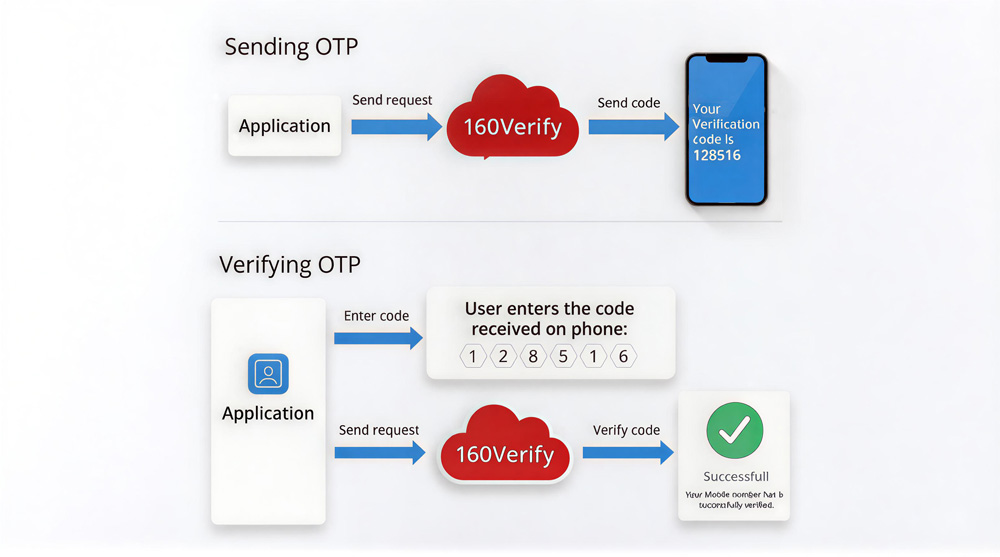
A standard OTP authentication flow using 160Verify looks like this:
- A user enters their mobile number in your application
- Your backend requests an OTP to be sent via 160Verify
- The user receives the OTP via SMS
- The user enters the OTP in your application
- Your backend verifies the OTP with 160Verify
- Access is granted or denied based on the verification result
This approach ensures that only users who can receive SMS messages at the specified number can proceed.
160Verify Service Setup
Use the SMS OTP Management screen to define how your OTP should behave (number of digits and expiry time in minutes) and to monitor results.
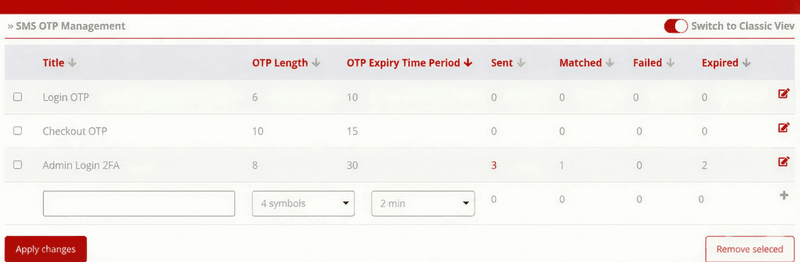
Figure 1: The SMS OTP Management Configuration Screen
Step-by-step Setup
- Go to 160Verify Management.
-
In the bottom row:
- Title: enter a meaningful label (e.g., Login OTP, Checkout Verification, Admin 2FA).
- OTP Length: choose the number of digits (commonly 6).
- OTP Expiry Time Period / TTL: choose how long the OTP is valid (commonly 5–10 minutes).
- Click Apply changes to save.
After saving, your configuration will have an otpId (shown/available via API). You will use that otpId in your application when sending/verifying OTPs.
Understanding Dashboard Analytics
The dashboard provides real-time columns to track your OTP performance:
| Dashboard Column | Description | Triggered By |
|---|---|---|
| Sent | OTP messages submitted/sent for that configuration. | /send API call |
| Matched | Correct code entered before expiry (even if wrong codes were entered previously). | statusCode = 3 |
| Failed | One or more codes were entered and none matched. | statusCode = 4 |
| Expired | No code was entered (submitted to us to verify) before the TTL elapsed. | statusCode = 5 |
statusCode = 6, which represents a Used code (a second or subsequent match attempt for an already verified OTP).
API Workflow
You will typically implement this high-level flow:
-
GET /v1/otp
List OTP configurations (to find your
otpId) -
POST /v1/otp/{otpId}/send
Send OTP to user:
{ "phone": "..." } -
POST /v1/otp/{otpId}/verify
Verify the code:
{ "phone": "...", "code": "123456" }
Example Implementation (PHP)
username:sms-secret string.
1 Send OTP (PHP)
Sends an OTP SMS to the user's mobile number. We also check the response to ensure the message was accepted.
<?php
$otpId    = 123;
$phone    = '61412345678';
$username = 'your_username';
$secret   = 'your_sms_secret';

$url = "https://api.160.com.au/v1/otp/$otpId/send";

$data = json_encode([
    'phone' => $phone
]);

// Create Basic Auth Header (base64 encoded username:secret)
$authHeader = 'Authorization: Basic ' . base64_encode("$username:$secret");

$ch = curl_init($url);
curl_setopt($ch, CURLOPT_POST, true);
curl_setopt($ch, CURLOPT_POSTFIELDS, $data);
curl_setopt($ch, CURLOPT_RETURNTRANSFER, true);
curl_setopt($ch, CURLOPT_HTTPHEADER, [
    $authHeader,
    'Content-Type: application/json'
]);

$response = curl_exec($ch);
$httpCode = curl_getinfo($ch, CURLINFO_HTTP_CODE);
curl_close($ch);

// Check if request was successful (HTTP 200)
if ($httpCode >= 200 && $httpCode < 300) {
    echo "OTP sent successfully: " . $response;
} else {
    echo "Error sending OTP. HTTP Code: " . $httpCode . " Response: " . $response;
    // Handle error logic here (e.g., log error, show message to user)
}
?>
2 Verify OTP (PHP)
Verifies the user's input against the active OTP session.
<?php
$otpId    = 123;
$phone    = '61412345678';
$code     = '128516';   // code user entered
$username = 'your_username';
$secret   = 'your_sms_secret';

$url = "https://api.160.com.au/v1/otp/$otpId/verify";

$data = json_encode([
    'phone' => $phone,
    'code'  => $code
]);

// Create Basic Auth Header (base64 encoded username:secret)
$authHeader = 'Authorization: Basic ' . base64_encode("$username:$secret");

$ch = curl_init($url);
curl_setopt($ch, CURLOPT_POST, true);
curl_setopt($ch, CURLOPT_POSTFIELDS, $data);
curl_setopt($ch, CURLOPT_RETURNTRANSFER, true);
curl_setopt($ch, CURLOPT_HTTPHEADER, [
    $authHeader,
    'Content-Type: application/json'
]);

$response = curl_exec($ch);
curl_close($ch);

$result = json_decode($response, true);
$statusCode = $result['verify']['statusCode'] ?? null;

if ($statusCode == 3) {
    echo "OTP verified successfully";
} elseif ($statusCode == 4) {
    echo "Incorrect OTP";
} elseif ($statusCode == 5) {
    echo "OTP expired";
} else {
    echo "Verification failed or error occurred.";
}
?>
Conclusion
OTP authentication remains one of the most effective ways to verify user identity. With 160Verify, businesses gain a purpose-built verification API that combines SMS delivery, OTP lifecycle management, and verification logic into a single, auditable workflow.
Ready to build?
Sign up for a free trial — free SMS credits included — and your OTP flow can be live today. 160Verify is part of our Australian SMS API.
Get a free API key API docs & Swagger sandbox